One app for the text coming in and the text going out.
Most text work falls into two moments. You are trying to understand what came in, or you are trying to say clearly what goes out. ClipWise helps with both.
Understand what comes in
Summarize long messages, clarify difficult wording, translate text, extract action items, and fact-check claims when needed.
Say clearly what goes out
Rewrite awkward phrasing, shorten rambling text, expand rough notes, structure your thoughts, draft a reply, or translate your own writing into the language you need.
The action comes to the work you are already doing.
No opening a chatbot, pasting text into it, waiting, copying the result, and switching back again.
When speaking is easier than typing.
Press the voice shortcut and speak to turn your thoughts into written text. Then copy, rewrite, or translate the result. It is voice to text built to help finish the message — not just capture raw speech.
Text stuck in an image? Pull it out and keep going.
When text is trapped in a screenshot, slide, image, or unselectable PDF, ClipWise can extract it and continue the workflow. You can also describe an image or summarize what is on screen.
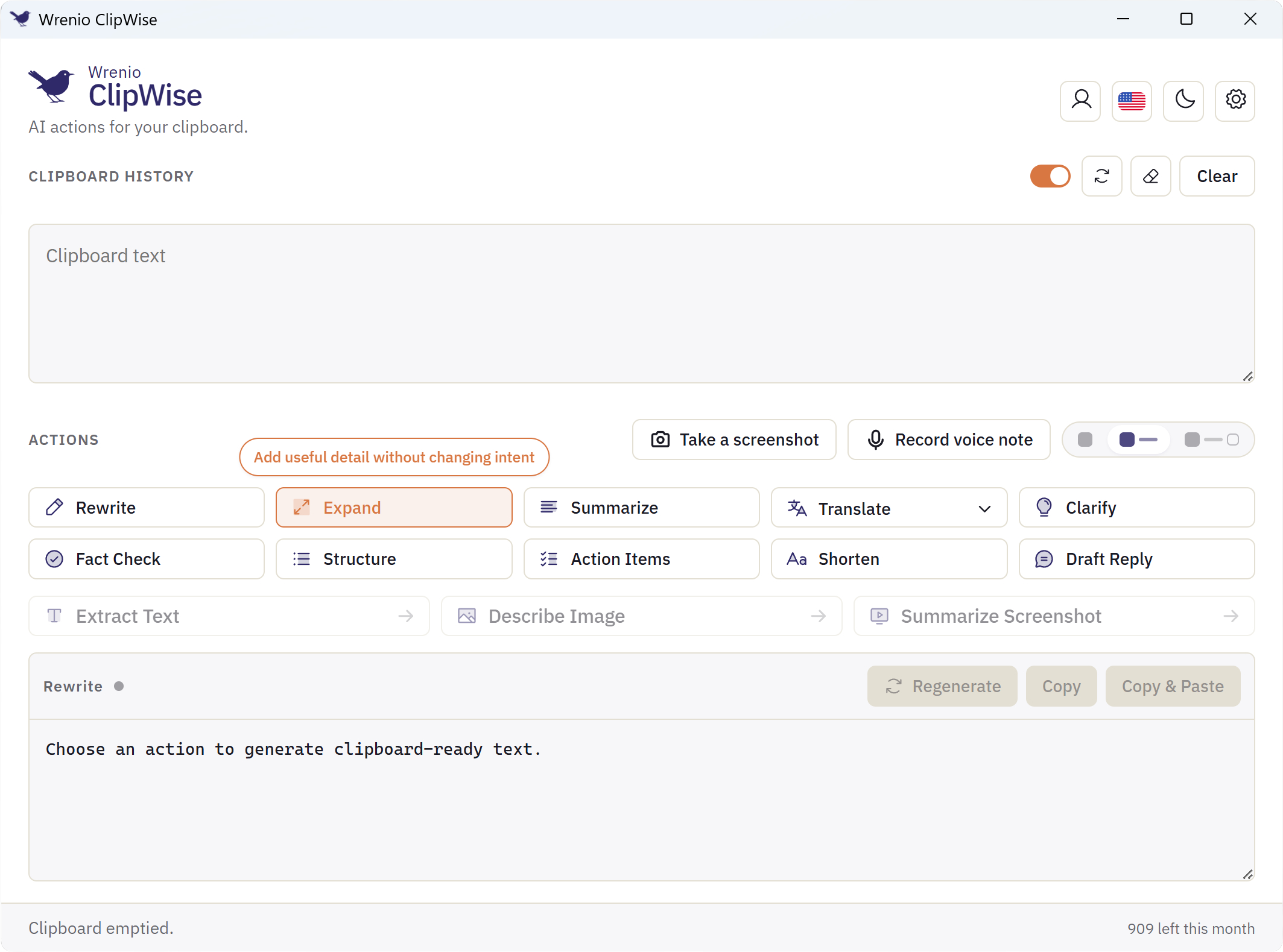
13 AI actions, plus voice to text and clipboard history.
Ten text actions, three image actions, voice to text, built-in screenshot capture, and persistent local clipboard history — each a click or shortcut away.
Built for the language you work in — even when it is not your first.
Reading takes longer when unfamiliar wording has to be translated in your head. Writing takes longer when every sentence gets checked three times before you send it. And sometimes you know exactly what you want to say, but speaking the thought is easier than typing it clearly.
ClipWise helps with all three moments. Understand incoming text faster, improve the message you are writing, or press the voice shortcut and turn a spoken thought into clear written text — without leaving the app you are already in.
Fewer tools. Less switching. More flow.
Many people use a grammar checker, a translation site, a chatbot, a speech-to-text app, and an OCR tool side by side. ClipWise brings the everyday version of those jobs into one app, right where the work is already happening.
Rewrite and reshape
Rewrite, summarize, clarify, shorten, expand, structure, and draft replies — in the app you are already typing in.
Speak, then shape it
Press the shortcut and speak, get it as written text, then rewrite or translate the result in the same window.
Text out of images
Extract text from screenshots, slides, and unselectable PDFs, then keep working on what you pulled out.
ClipWise's advantage is breadth in one place — not trying to beat every specialist on depth.
Easy to start. Careful by default.
Managed AI, no API key
ClipWise Managed AI is included. Sign in with your email and start — no API key required. Every account, free or paid, gets the free daily allowance.
Or bring your own AI
Add your own OpenAI or Anthropic API key, or run a compatible local Ollama model for supported text and image tasks. Keys are stored in your operating system’s keyring, never on ClipWise servers.
Clipboard history stays local
Your clipboard history is stored on your own device, not synced to a server. Managed and cloud-provider actions send the relevant content to the configured service; only a local Ollama model keeps processing on your machine.
Choose the setup that fits your workflow.
Free plan with no time limit. Current allowance: 10 Managed AI actions a day.Paid plans from $4.99/month, chosen right inside the app (Settings → AI).
Frequently asked questions
ClipWise is listed on software directories and launch platforms — see where it is featured →